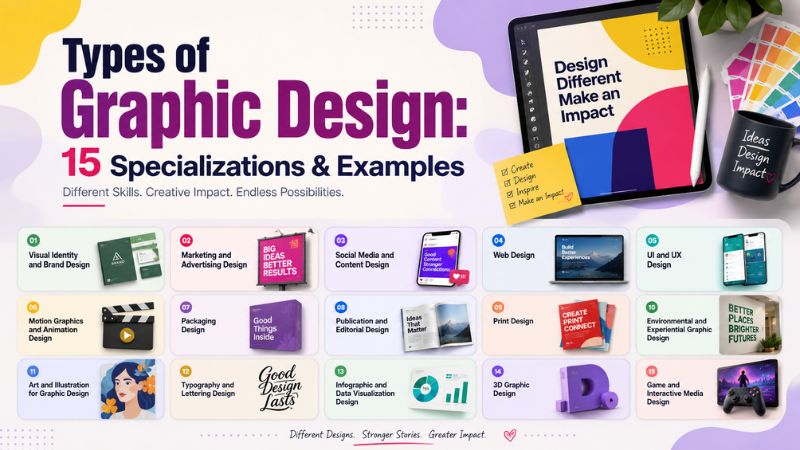

Types of graphic design go far beyond logos and social media posts. Graphic design combines creativity and visual communication to inform, engage, and influence audiences across digital and print platforms.
From billboards and product packaging to websites, apps, and infographics, every design serves a specific purpose. Understanding the different types of graphic design helps businesses, aspiring designers, and individuals choose the right creative solution for their goals.
However, with so many specializations available, knowing where to start isn’t always easy. This guide explores 15 common graphic design types, explaining what each one does, where it’s used, who it’s best for, and how to choose the right specialization. You’ll also learn beginner-friendly fields, common misconceptions, and key career insights.
Table of Contents
ToggleWhat is Graphic Design?
Graphic design is the art and practice of combining visual elements (such as typography, imagery, color, and layout) to communicate ideas, information, or messages effectively. Expert graphic designers blend creativity and strategy to create designs that look great, engage audiences, and help businesses grow.
From brand logos and product packaging to app interfaces, design shapes how people perceive and interact with brands in both print and digital media. In 2026, Business Research Insights reports that approx. 63% of companies rely on graphic design for online marketing campaigns, improving engagement by 34%.
What are the Basic Elements of Graphic Design?
The basic elements of graphic design are as follows:
- Line: A stroke connecting two points; it guides the viewer’s eye, divides sections, creates shapes, and adds structure to a design. It might be straight, curved, thick, thin, dashed, or decorative. Example: dividers on a website, borders, and underlines.
- Shape: A self-contained area (geometric, organic, or abstract) that organizes space and builds icons or symbols. Example: app icons, buttons, and logos.
- Color: Hues, tints, and tones used to set moods, evoke emotions, and strengthen brand recognition. Example: Coca-Cola’s red, Spotify’s green, and IKEA’s blue and yellow.
- Space: Positive space (the subject) and negative/white space (the empty area) that give a design room to breathe. Example: Apple’s minimalist product pages use generous white space to emphasize products.
- Texture: Texture adds depth and visual interest to a design, such as smooth, rough, glossy, or tactile. It can be physical in print or simulated digitally.
- Typography: The style, arrangement, and appearance of text that ensures readability and message delivery to viewers. Example: Headlines, body text, and call-to-action buttons on a website.
- Scale & Size: Size determines the visual importance of an element, while scale refers to the relationship between different elements. Example: A large headline paired with smaller supporting text.
- Image & Illustration: Photos, illustrations, icons, and graphics add personality, tell stories, and create emotional connections. Example: Product photos on eCommerce websites or custom illustrations on SaaS landing pages.
- Form: It gives objects a three-dimensional appearance through shading, perspective, and lighting. Example: 3D product mockups, app icons, and realistic illustrations.
What are the Main Principles of Graphic Design?
The main principles of graphic design are as follows:
- Balance: The distribution of visual weight in a layout. Symmetrical balance uses mirroring elements along a center axis for a calm, formal feel. Asymmetrical balance uses contrasting elements of different sizes or weights to create dynamic, modern layouts.
- Contrast: The purposeful use of differences in color, size, or texture to make specific elements pop and command attention. High contrast is also a critical component of accessible design, ensuring text is readable for all users.
- Hierarchy: Visual hierarchy organizes information based on importance using size, color, spacing, and placement. It helps users scan content and understand the message in the right order.
- Alignment: It ensures that all design elements are visually connected and arranged in an orderly way. Proper alignment creates a clean, professional, and easy-to-read layout.
- Repetition: It reinforces consistency by using the same colors, fonts, icons, or design styles throughout a project. It strengthens brand identity and creates a cohesive visual experience.
- Proximity: It groups related elements together so viewers can easily understand their relationship. It reduces clutter and improves content organization.
- White Space: It is the empty area around design elements. It improves readability, creates breathing room, and helps important content stand out without overwhelming the viewer.
Graphic design principles help transform individual design elements into visually effective compositions.
What are the 15 Main Types of Graphic Design?
The 15 main types of graphic design are described below:
1. Visual Identity and Brand Design
Visual identity and brand design focus on creating a consistent visual image that represents a business, organization, or individual. It combines design elements like logos, colors, typography, and brand guidelines to help people instantly recognize and remember a brand.
Best for startups, small businesses, corporations, and e-commerce companies. Real-world examples are:
- Nike: The iconic Swoosh logo, bold typography, and minimalist design create one of the world’s most recognizable brand identities.
- Coca-Cola: The classic script logo and signature red color have remained recognizable for decades.
2. Marketing and Advertising Design
Marketing and advertising graphic design is the practice of creating visual assets, such as images, typography, and layouts, to promote a brand, product, or service. It combines creative art with consumer psychology to communicate a business message, capture attention, generate leads, and drive sales.
Best for retail brands, marketing agencies, SaaS companies, and event organizers. Real-world examples are:
- McDonald’s: Bold food photography with simple messaging and strong brand colors.
- Spotify Wrapped: Personalized campaign graphics that encourage users to share their listening habits.
3. Social Media and Content Design
It involves creating engaging visual content for platforms like Instagram, Facebook, LinkedIn, TikTok, Pinterest, and YouTube. The goal is to increase engagement, strengthen brand presence, and communicate messages quickly in fast-scrolling feeds.
As a social media and content designer, you create carousel posts, infographics, quote graphics, email newsletter graphics, and so on. Real-world examples are:
- Netflix: Branded promotional posts for new releases.
- Duolingo: Humorous social media graphics that strengthen its playful brand personality
4. Web Design
Web design is the process of designing the visual appearance, layout, and overall user experience of websites. It combines visual with functionality to ensure visitors can easily navigate the site, from color schemes and typography to layout and navigation.
Web designers mostly create landing pages, e-commerce store designs, layouts and page designs, hero sections, and so on. Real-world examples are:
- Stripe: Modern interface with excellent typography and interactive visuals.
- Dropbox: Simple, user-focused design that makes navigation effortless.
5. UI and UX Design
UI (user interface) design handles the visual and interactive elements of software, websites, or apps. It brings the wireframes to life with style, branding, and polish.
Afterwards, UX (user experience) is the process of creating products or services that provide a meaningful, intuitive, and enjoyable experience for users. It focuses on the “behind-the-scenes” functionality, mapping out exactly how a user navigates an app or website landing page to solve user problems.
UI/UX designers combine both experiences to make apps and websites simple, helpful, and fun for people. Real-world examples are:
- Uber: Integrates GPS tracking, clean status updates, and cashless checkouts to simplify ride-hailing.
- Notion: Replaces heavy tutorials with a clean, blank-slate minimalist UI that lets users build custom workspaces intuitively.
6. Motion Graphics and Animation Design
Motion graphics and animation design bring static visuals to life through movement. Designers combine graphics, text, illustrations, and visual effects to create engaging content that explains ideas, tells stories, or promotes products across digital platforms.
Animators design product demos, animated logos, product demos, and so on. Common motion and animation design types are 2D & 3D animation, motion graphics, explainer videos, etc. Real-world examples:
- Google: Leverages changing interactive animations on its search homepage to celebrate holidays, global events, and data trends through playful movement.
- PayPal: Employs clean vector shapes, minimal line outlines, and smooth asset transitions in animated explainer content to project digital trust and ease of use.
7. Packaging Design
Packaging design is the process of creating the visual appearance and structural layout of a product’s packaging. It combines branding, marketing, and functionality to protect the item, shares vital brand and legal information, and attracts buyers on a store shelf.
Key purposes of this design are to communicate product information to buyers, increase sales, brand awareness, and customer trust. For example,
- Glossier: Relies on soft pink pouches, minimalist white space, and understated text. Unboxing feels personal and calm.
- Graza: Uses dark green squeeze bottles with bright neon caps. It mimics professional restaurant gear and makes pantry use fun.
8. Publication and Editorial Design
Publication and editorial design focuses on organizing text, images, and graphics into visually appealing layouts for printed and digital publications. The goal is to improve readability while reinforcing the publication’s style and brand identity.
Common design types are book design, digital publications, catalogs, magazine layout, etc. For example,
- National Geographic magazine layouts.
- The New York Times print and digital editorial layouts.
9. Print Design
Print design involves creating visual materials that are produced on physical media rather than digital screens. Print designers consider layout, color accuracy, paper quality, and printing techniques to ensure the final product looks professional and communicates its message effectively.
The key purpose of this design is to promote products, build brand recognition in physical spaces, and provide informational materials. They design brochures, flyers, posters, banners, catalogs, etc. For example,
- McDonald’s: Vibrant primary colors, bold typography, and clever container graphics make wrappers and bags instantly recognizable.
- MOO: Known for showing off print tech, they use spot gloss, Luxe thick cotton papers, and foil accents on business cards.
10. Environmental and Experiential Graphic Design
Environmental and experiential graphic design combines graphic design, architecture, and interior design to create visually engaging physical spaces. It helps people navigate environments, reinforces brand identity, and enhances user experiences through strategic visual communication.
Designers create graphics that blend seamlessly with buildings, public spaces, exhibitions, and events. Common design types are exhibition design, corporate branding environments, retail environmental graphics, etc. For example,
- Tech campus culture walls: Large-scale wall graphics showcasing a company history timeline or core values.
- Lush: Storefronts feature vibrant, sensory-rich product displays paired with massive dynamic LED screens that broadcast a playful, eco-conscious ethos.
11. Art and Illustration for Graphic Design
Art and illustration focus on creating original visual artwork that supports communication, storytelling, and branding. Unlike stock images, illustrations are custom-made to express a unique style, personality, or concept across digital and print media.
Expert art and illustration design includes editorial illustrations, product illustrations, website and app illustrations, social media graphics, and advertising visuals. For example,
- Mailchimp: Built a recognizable brand identity through distinctive illustrated graphics.
- Illustrated Logos: Mascot designs or hand-drawn emblems unique to a company’s identity.
12. Typography and Lettering Design
The design focus is on arranging, designing, and customizing text to improve readability and visual appeal. While typography works with existing typefaces, lettering involves creating unique, hand-crafted letterforms for branding and creative projects.
Designers design custom fonts and typefaces, website typography, book layouts, product labels, packaging typography, and so on. For example,
- Coca-Cola features one of the world’s most recognizable custom script logos.
- Disney features a whimsical, custom fairytale script based on signature handwriting.
13. Infographic and Data Visualization Design
Infographic and data visualization design transforms complex information, statistics, and datasets into clear, visually engaging graphics. The goal is to make information easier to understand, compare, and remember.
Expert designers design infographics, research presentations, process infographics, comparison infographics, and so on. For example, the
- World Health Organization (WHO) uses infographics to communicate public health information.
- Nike (Nike+ Ignites Movement) built layered, isometric data ecosystems with agencies
14. 3D Graphic Design
3D graphic design creates realistic or stylized three-dimensional visuals for products, advertising, architecture, entertainment, and digital experiences. Designers use modeling, texturing, lighting, and rendering techniques to produce lifelike images and animations.
These designs are best for product manufacturers, gaming studios, advertising agencies, automotive brands, and so on. For example,
- Tesla showcases vehicles using photorealistic 3D renders in marketing campaigns.
- Wayfair uses interactive 3D modeling so customers can preview furniture scale and fit inside a real room.
15. Game and Interactive Media Design
Game and interactive media design combines graphic design, storytelling, animation, and user experience to create engaging digital experiences. Designers develop visuals that allow users to interact with games, apps, websites, virtual reality (VR), and augmented reality (AR).
These designs are best for SaaS businesses, AR/VR developers, interactive media agencies, and so on. For example,
- Wendy’s launched Feast of Legends, a fully realized tabletop role-playing game (TRPG) designed completely around their brand lore and fast-food menu items.
- IKEA developed immersive augmented reality (AR) apps allowing users to interactively place, test, and scale 3D furniture models inside their real living rooms.
How Do You Choose the Right Graphic Design Specialist?
Choosing the right graphic design specialist starts with identifying your project goals. A specialist with relevant experience can help you achieve better results, reduce revisions, and complete projects more efficiently.
Here’s what to look for:
- Choose someone with relevant expertise. A branding project needs a brand identity designer, while an app or website requires a UI/UX designer.
- Review their portfolio. Look for projects similar to yours to evaluate their style, quality, and problem-solving ability.
- Check industry experience. Designers familiar with your niche often understand your audience and business goals better.
- Prioritize communication. A good designer asks questions, understands your requirements, and provides clear timelines and feedback.
- Start with high-quality assets. Even the most skilled designer needs clean, professional images to create polished visuals.
Whether you’re a freelance designer creating marketing materials or an individual launching a business, the quality of your images directly affects the final design. Poor backgrounds, inconsistent colors, or distracting imperfections can limit the impact of otherwise great creative work.
That’s why many designers and businesses rely on Graphic Aid before the design process begins.
Their professional photo editing team prepares production-ready images with services such as background removal, clipping paths, color correction, image masking, ghost mannequin editing, shadow creation, and high-end retouching.
Instead of spending hours fixing images, you can focus on creativity while working with clean, consistent visuals that are ready for websites, advertisements, catalogs, social media, and print.
Which Types of Graphic Design Are Best for Beginners?
If you’re new to graphic design, it’s best to start with specializations that build strong design fundamentals before moving into more technical fields.
Here are the best options for beginners:
- Brand Identity Design (Best Starting Point): Learn the fundamentals of logos, color theory, typography, and visual branding. It provides a solid foundation for almost every design career.
- Marketing & Advertising Design: Create social media posts, banners, flyers, posters, and digital ads. It’s one of the most in-demand skills for freelancers and businesses.
- Social Media Graphic Design: Practice designing content for platforms like Instagram, Facebook, LinkedIn, and Pinterest while improving layout and visual storytelling.
- Print & Publication Design: Design brochures, business cards, magazines, and catalogs to understand grids, typography, and print layouts.
- Packaging Design: Learn how branding, product presentation, and consumer psychology work together to create attractive packaging.
- Basic Illustration: If you enjoy drawing, illustration helps strengthen creativity and develop a unique visual style that complements graphic design.
However, before choosing one, focus on essential design skills that we’ve discussed earlier.
Generalist vs. Specialist Graphic Designer
A graphic design generalist handles a wide array of visual tasks, like branding, print layout, social media assets, and basic web design. On the contrary, a specialist graphic designer focuses deeply on a single niche such as typography, motion graphics, packaging, or brand identity systems.
The key differences between these two graphic designers are shown in a table below:
| Key Aspects | Generalist Graphic Designer | Specialist Graphic Designer |
|---|---|---|
Primary focus | Handles multiple design disciplines | Masters one specific design field |
Best for | Small businesses, startups, personal brands, general marketing needs | Complex projects requiring specialized knowledge |
Project variety | High | Focused within one niche |
Creative flexibility | Can adapt to different design requests | Delivers refined solutions for specialized challenges |
Clients | Entrepreneurs, local businesses, agencies with varied needs | Large brands, specialized industries, enterprise projects |
Cost | Budget-friendly for diverse projects | May charge higher rates due to niche expertise |
Work example | Creates logos, flyers, social posts, and presentations | Designs mobile apps, product packaging, motion graphics, or publication layouts |
Quick overview:
- A Generalist is best when you need multiple marketing assets from one designer.
- A Specialist is best when your project requires advanced knowledge in a specific design field.
Common Misconceptions About Graphic Design Specializations
A common misconception is that graphic design is a single, interchangeable skill where every designer excels at everything. But in reality, graphic design is split into distinct specializations. Each requires unique technical proficiencies, strategic focuses, and specialized tools.
Some common misconceptions are as follows:
"One Graphic Designer Can Do Everything"
Many designers have a broad skill set; most specialize in specific areas such as branding, UI/UX, packaging, or motion graphics. Hiring the right specialist often leads to better results.
"Graphic Design is Just About Making Things Look Good"
Good design isn’t only visual; it’s strategic. Every design should communicate a message, solve a problem, and help achieve a business or marketing goal.
"Photo Editing and Graphic Design are the Same"
They’re different but complementary. Photo editing improves image quality, while graphic design uses those refined images to create marketing materials, websites, packaging, and other visual assets. Collaborating with a photo editing agency, you benefit most.
"Generalists and Specialists Deliver the Same Results"
Generalists are great for handling a variety of everyday design tasks. Specialists bring deeper expertise for complex or niche projects where precision matters.
"Only Large Businesses Need Specialized Designers"
Businesses of any size can benefit from hiring the right specialist. Whether you’re launching a startup, building a personal brand, or running an online store, specialized expertise often saves time and improves quality.
"AI Can Replace Graphic Design Specialists"
AI can speed up brainstorming and repetitive tasks, but it can’t replace creative strategy, brand thinking, industry experience, or human judgment. Professional designers still play a vital role in creating meaningful and effective visual communication.
“Design Doesn’t Affect Business Results”
Good and branded design directly influences how people perceive your brand, interact with your products, and make purchasing decisions. Effective design can improve credibility, engagement, and conversions.
The best results come from matching your project with the right graphic design specialization.
Frequently Asked Questions
What is the most in-demand type of graphic design right now?
Digital and web-focused, like UI/UX design and Digital Brand Identity design, are the most in-demand types of graphic design.
What's the difference between graphic design and UI/UX design?
Graphic design focuses on creating static visual content like logos and posters to communicate a message. In contrast, UI/UX design is problem-solving focused on how users interact with and experience digital products like apps and websites through interactive layouts and user research.
Can one designer specialize in more than one type?
Yes. One designer can specialize in more than one type of design. Many professionals adopt a hybrid skill set, combining deep expertise.
Where does product photo editing fit into graphic design?
Product photo editing serves as the essential pre-visual foundation for graphic design. It acts as a core technical bridge, transforming raw commercial photography into optimized, clean raster assets ready for layouts, packaging, e-commerce sites, and advertising campaigns.
Do I need a graphic designer or a photo editor for eCommerce images?
You need both, but for different stages of your eCommerce visuals. A photo editor fixes and enhances raw photos (background removal, color correction, and retouching), while a graphic designer builds overall layouts, marketing banners, social media ads, and brand identity.
Conclusion
From branding and packaging to UI/UX and motion graphics, every type of graphic design plays a role in visual communication. Understanding these specializations helps you choose the right design approach for your goals, whether you’re starting a design career or growing a business.
And if your project relies on high-quality visuals, Graphic Aid’s professional photo editing services can help you create polished, design-ready images that make every graphic more impactful.