
Ghost mannequin editing is one of the most practical upgrades you can make to your apparel ecommerce presentation. It makes products easier to judge, faster to browse, and cleaner across your entire store. When it’s done right, your collection instantly looks more structured, more polished, and more premium. And the best part? It keeps everything consistent across colorways, new drops, and restocks, so your catalog doesn’t start looking messy the moment you scale.
But that’s just the surface. Ghost mannequin editing can unlock a lot more presentation wins than most store owners realize.
So in this guide, you’ll learn:
- What ghost mannequin editing actually is.
- Why presentation matters more than most store owners think.
- How editing improves fit, structure, focus, zoom, and premium feel.
- When it’s smarter to hire an editing service instead of burning time doing it in-house.
No filler. No vague claims. Just real, practical insight you can apply to your product pages.
Table of Contents
ToggleWhat Is Ghost Mannequin Editing?
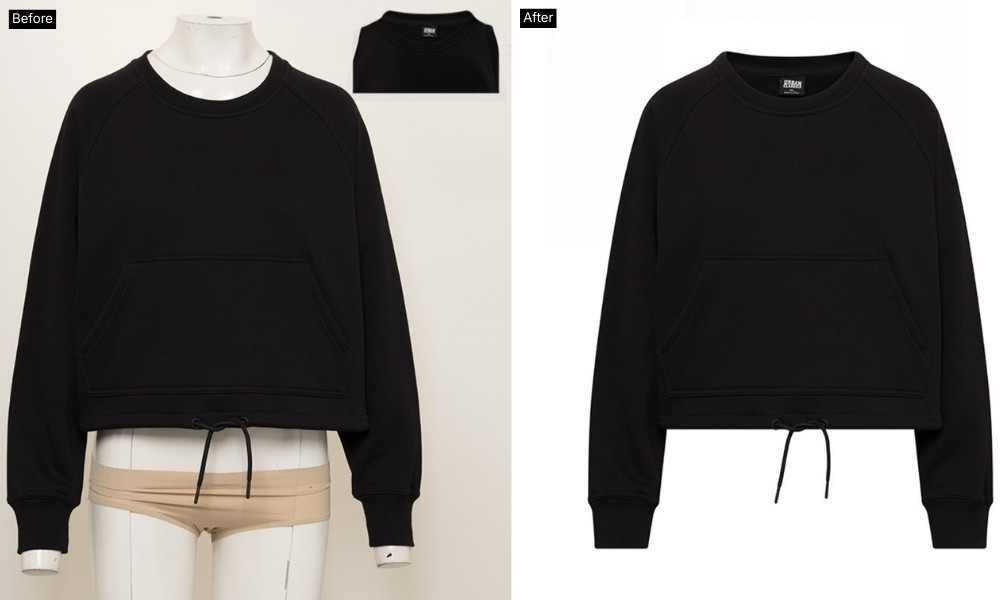
Ghost mannequin editing is when you remove the mannequin from a clothing photo so the garment appears to be worn by an invisible body, with a clean 3D shape.
In a typical product shoot, the garment is placed on a mannequin to maintain its proper shape. The problem is that mannequins look distracting and make the image feel less premium. Ghost mannequin editing addresses this issue by removing the mannequin in post-production while preserving the garment’s natural structure.
The goal of this method is simple. Make the clothing look wearable and realistic without showing a person or mannequin.
Ghost mannequin editing usually combines two or more photos:
- Main shot: the garment on the mannequin, styled neatly
- Insert shot: a second shot to show the inside of areas like the neck or collar (sometimes also sleeves or waist)
Then the editor:
- Cuts the mannequin out cleanly
- Blends the insert shot so the neckline looks natural rather than a flat cutout.
- Cleans up small issues such as lint, wrinkles, uneven edges, and loose threads.
- Matches color and brightness so the product looks consistent across the catalog.
Why Apparel Presentation Matters in eCommerce?
In apparel ecommerce, customers cannot touch the fabric, try the fit, or check the stitching in person. So they do the next best thing. They judge the product through your photos.
That is not a preference. It is how people shop online. Baymard’s usability testing found that 56 percent of users first explore product images on a product page.
And they want to zoom in on the images to see every detail. If the image quality is not strong enough to inspect details, people either get stuck in doubt or bounce. Baymard also found that many sites still fail to provide sufficient image resolution and zoom for how users evaluate products.
Here is what a strong presentation actually changes for an ecommerce owner:
- It reduces hesitation on the product page. Shoppers want quick answers like “What is the shape?” “How does it sit?” “Is it clean and well made?” Clear, structured visuals remove guesswork and speed up decisions.
- It protects you from expensive returns. Returns are a major cost center in ecommerce, and apparel is particularly hard-hit because expectations are largely set by visuals. NRF projected 19.3 percent of online sales returns in 2025, and the total retail returns reached $849.9 billion. When your presentation is unclear, the chance of “not what I expected” goes up.
- It saves your store from inconsistency as you scale. When one product shot looks warm, another looks cool; different crop sizes, different shapes, different lighting, it makes your brand feel messy; even if the products are good. Consistent presentation makes browsing easier and makes your store feel more legitimate.
- It matters more on mobile than people admit. On a phone, customers scroll fast and judge faster. If the product does not read clearly in a thumbnail, you lose the click. If it does not hold up when they zoom, you also lose the purchase.
- It affects visibility, not just conversions. Product images also live outside your site, on platforms like Google Images and Discover. Google’s own guidance focuses on helping search engines discover and index images and optimizing for speed and quality. Better presentation supports both trust and discoverability.
Note: Read more to learn about - "Why Ghost Mannequin Photography Matters for Apparel eCommerce"
How Ghost Mannequin Editing Improves Apparel Presentation?
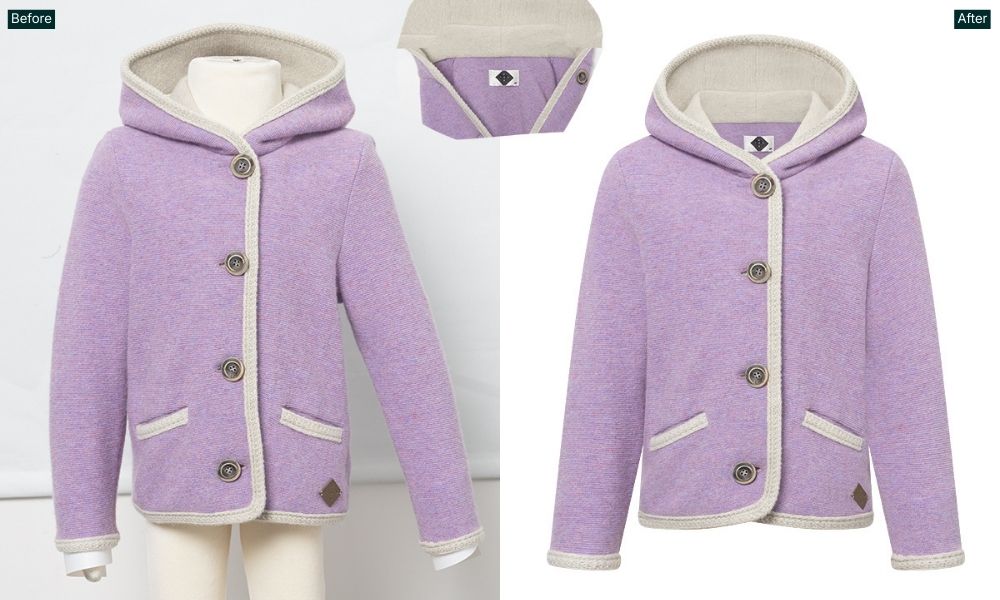
Ghost mannequin editing is not something exaggerated or a bluff; it creates a real impact. This technique improved the presentation, especially for apparel. Here’s what impacts you can see in your apparel presentation once ghost mannequin editing is included:
Shows Real Fit Without a Model
When someone shops for apparel online, they are trying to answer one question fast. How will this look when it is worn? The problem is that flat images often hide shape, and model shots aren’t always realistic for every SKU, color, or restock.
Ghost mannequin editing solves that by keeping the garment’s natural volume from the mannequin while removing the mannequin itself. So the item still looks wearable and three-dimensional, but the viewer only sees the product. That means the shoulder line looks intentional, the sleeves hold their form, the torso has depth, and the drape feels believable rather than flat.
It also fixes the “cutout look” that turns shoppers off. A good edit builds a realistic neck, collar, and inner-label area using a clean composite. That small detail makes a big difference because it signals that the product is real, not a floating shape.
What this helps the shopper judge faster:
- silhouette and overall fit type (boxy, slim, relaxed)
- structure in key areas (shoulders, collar, cuffs)
- how the fabric falls and holds shape
One great aspect is that it maintains trust. Ghost mannequin shows shape well, but it does not replace fit on different body types. It works best as your clean catalog image, paired with a size chart and at least one real-fit reference.
Creates a Professional Look
A professional presentation is not about making the product look “perfect.” It is about making the product look controlled. Clean edges, balanced lighting, consistent background, and a tidy frame tell the shopper you run a serious store.
Ghost mannequin editing upgrades that professionalism by highlighting the parts customers notice subconsciously:
- Crisp, smooth cutout edges that do not look jagged
- Clean transitions around sleeves, hems, and side seams
- Controlled shadows that look natural, not heavy or random
- Background that stays consistent across the catalog
Then it handles the small stuff that quietly damages perception. Lint, dust, loose threads, crease marks, and fabric fuzz can make a product look cheaper than it is. When those distractions are cleaned without over-editing the fabric, the product reads as higher quality.
A professional edit also stays honest. It cleans and balances, but it does not change the product’s actual composition. That matters because the fastest way to lose trust is when the delivered item looks different than the photo.
Highlights Product Structure & Details
Apparel buyers care about construction, even if they don’t use technical terms. They look for signs of quality, such as clean seam lines, sharp collars, and well-shaped cuffs. The issue is that raw photos often hide these details due to uneven lighting, shadows, or background noise.
Ghost mannequin editing helps details show up by keeping the garment structured and making the frame cleaner. When the mannequin is removed and the image is refined, the shopper can actually see what makes the garment worth buying.
This is where editing adds real value:
- Collars look clean and dimensional, not collapsed
- Stitching and seam placement become easier to follow
- Pleats, panels, ribbing, and piping show clearly
- Design details stop blending into the background, especially on dark items
Good editors also avoid the common trap of over-sharpening. The goal is clarity, not a crunchy fake texture. When the edit is done right, the product looks detailed and natural at the same time.
Eliminates Distractions
Distractions cost attention, and attention is your first battle on a product page. Mannequin edges, clips, pins, weird shadows, and messy backgrounds distract shoppers from the garment. Even when shoppers cannot explain what feels off, they feel it.
Ghost mannequin editing removes distractions, making the product the only thing in the frame. That makes the photo easier to understand quickly and keeps the customer from getting stuck on questions that shouldn’t even exist.
The most common distractions editing removes:
- Mannequin parts showing through necklines or armholes
- Clips and pins used for styling
- Wrinkles that look like poor quality, not natural fabric behavior
- Background inconsistencies that make products look mismatched
This is also where your store starts to feel cleaner overall. Once the noise is gone, shoppers can browse longer without any mental fatigue.
Note: Read more to learn about - "In-House vs Outsourced Ghost Mannequin Editing: Cost & Quality"
Improves Visual Consistency
Consistency is one of the biggest hidden advantages in ecommerce. Customers browse in grids. They compare quickly. If every product looks like it was shot differently, the collection page feels messy, and your brand feels less reliable.
Ghost mannequin editing supports consistency by standardizing output across different shoots and batches. This matters when you are dealing with restocks, new drops, and seasonal transitions.
- What consistency looks like in practice:
- Same crop rules and product scale in the frame.
- Same background tone across categories.
- Same shadow strength and direction, so nothing looks out of place.
- Consistent color correction so whites stay white and blacks stay black.
- Consistent alignment to prevent products from tilting or drifting.
When your collection grid looks consistent, browsing becomes faster and more comfortable. That leads to more clicks into product pages and more chances to sell.
Makes Products Look Premium
Premium is not just pricing. Premium is the feeling that the product is worth trusting. A clean presentation creates that feeling by reducing doubt.
Ghost mannequin editing makes products look more premium by improving the signals shoppers associate with quality:
- Structured shape instead of flat fabric.
- Clean lines and smooth edges.
- Accurate color that does not shift from image to image.
- Visible details that hold up when the shopper looks closer.
The important part is restraint. Premium does not mean plastic. If editing removes every natural fold or erases texture, the product starts looking fake. The best ghost mannequin edits keep fabric behavior realistic while removing the elements that look like mistakes.
Improves Product Focus for Mobile Shoppers
Most online shoppers are on phones now, which means your first impression is often a tiny thumbnail on a collection page. On mobile, people scroll quickly and make decisions fast. If the product shape is unclear in a small view, you lose the click.
Ghost mannequin editing improves mobile performance by making the silhouette clear and the framing consistent. A clean, centered, balanced image reads better at small sizes. It also makes your product collection feel organized, helping shoppers keep browsing rather than getting overwhelmed.
Mobile-friendly results usually include:
- Strong, readable silhouette with clean edges.
- Consistent spacing so items look uniform in the grid.
- Reduced clutter to make the product stand out immediately.
- Predictable composition so shoppers know what to expect.
It is less about looking fancy and more about being easy to understand fast.
Supports Better Zoom
Better zoom is where trust gets tested. People zoom to verify texture, stitching, print quality, and finishing. If the image breaks down when they zoom in, the product feels risky.
Ghost mannequin editing supports zoom. Shoppers can verify texture, stitching, print quality, and finishing as much as they like. If the image breaks down when they zoom, shoppers instantly can feel demotivated to buy the product.
Ghost mannequin editing supports better zoom by cleaning the image in a way that holds up under inspection:
- Removing lint and dust that look like defects when zoomed.
- Fixing rough edges that become obvious up close.
- Balancing exposure so details are visible without blowing out highlights.
- Keeping color consistent so Zoom does not reveal weird shifts.
A clean edit also prevents common problems that often appear. If the background and edges are messy, zooming feels unpleasant and cheap. When the file is clean, zooming feels smooth, which quietly builds confidence.
Draws Customers’ Attention
Attention is not about loud visuals. Attention comes from clarity. When the product is centered, structured, and distraction-free, the eye lands on it naturally.
Ghost mannequin editing helps create that clarity through visual hierarchy. The garment becomes the obvious focal point because nothing else competes with it. That matters because once a shopper stops scrolling, they are far more likely to open the listing, swipe through the gallery, and take a closer look.
This is how attention turns into action:
- The clean first image earns the click from the collection page
- A clear shape keeps the shopper engaged on the product page
- Zoom-friendly detail helps them feel confident enough to buy
So the edit is not just cosmetic. It supports the whole buying flow from scroll to click to decision.
Best Apparel Products for Ghost Mannequin Editing
Ghost mannequin editing is used when shoppers need to see shoulders, collar stance, sleeve shape, and drape clearly, since the goal is to show an on-body look without a model. However, the type of apparel you use for such photography matters too.
Here are the apparel categories that deliver the biggest presentation upgrade in your store:
- Structured outerwear like blazers, coats, and jackets: These pieces look expensive when the shoulders, lapels, and torso shape are clearly defined. Ghost mannequin editing keeps that structure so the product does not look limp or boxy for the wrong reason.
- Dresses and one-piece styles: A dress needs body shape to make sense, especially around the top, waist, and silhouette. Ghost mannequin editing makes it look wearable rather than like fabric laid flat.
- Collared shirts and polos: Collars and plackets are small details, but they decide whether the item looks clean or cheap online. Ghost mannequin editing helps the collar sit right and keeps the neckline from looking like a flat cutout.
- Hoodies, sweaters, and knitwear: Knits can lose their shape in simple photos, and hoodies especially look better when the hood and sleeves hold volume. Ghost mannequin editing keeps the garment looking full and wearable, which sets it apart from looking premium and just simple meh.
- Activewear tops and fitted pieces: When a product’s value lies in the cut, panels, and contour seams, flat images may not show it well. Ghost mannequin editing keeps the lines readable so shoppers understand what makes the piece different.
- Tailored bottoms like trousers, skirts, and sets: Ghost mannequin can work really well when the rise, waist structure, and taper matter. Just keep it honest, because bottoms sometimes need extra angles to show the fit, and editing can get more complex depending on the cut.
When to Hire a Ghost Mannequin Editing Service for Your Apparel Store?

Hiring a ghost mannequin editing service makes sense when editing slows your store down more than shooting does. If your product photos are ready but your listings are still not going live on time, that is usually the moment outsourcing starts paying for itself.
So if you are considering hiring a Ghost mannequin editing service, here’s when you absolutely should:
If you have too much workload
If you are uploading new products every week, running multiple colorways, or restocking constantly, editing becomes a never-ending queue. Ghost mannequin editing is very labor-intensive, so even a small backlog can lead to delayed launches and inconsistent product pages. An editing service helps you keep pace without making your team stay stuck in Photoshop all day.
When your collection pages look inconsistent
When one product looks bright and another looks dull, or when cropping and spacing change from item to item, your store starts to feel messy. Most ecommerce owners notice this only after conversion starts slipping. Outsourcing helps because a good editing team can follow fixed standards for crop, background tone, shadow style, and color balance across the entire catalog.
If you need the neckline and shape
A basic cutout is easy. A clean ghost effect that looks natural is not. The collar area, sleeve openings, and inside neck insert are the parts that separate a professional result from a cheap one. If your current edits look flat, awkward, or inconsistent, hiring specialists usually fix it faster than trying to train and troubleshoot internally.
Note: Read more to learn about "How to Choose the Right Ghost Mannequin Editing Company"
When your team has too many repetitive tasks
Problems like lint, wrinkles, loose threads, label flips, background fixes, and small shadow problems, but it is time-consuming, and it adds up across dozens of products. If your team is spending hours on cleanup instead of running merchandising, ads, and site updates, outsourcing becomes a practical trade.
If you sell on marketplaces
Marketplaces reward clean, product-first images and punish messy ones. If you keep getting images that look inconsistent, cluttered, or not clean enough for the platform, an editing service helps you maintain a consistent, clean standard across all listings. It also helps when you need the same item delivered in multiple formats for Amazon, Shopify, and other channels.
If you want a faster turnaround
Speed usually breaks quality when you do everything in-house. Outsourcing lets you keep quality consistent while still moving quickly, especially during launches and seasonal peaks. The key is choosing a service with a clear turnaround time and a process that remains consistent from order to order.
Frequently Asked Questions (FAQs)
How much does ghost mannequin editing cost per image?
It ranges from under $1 per image for high-volume services to a few dollars per image, depending on complexity and turnaround time. However, freelance marketplaces vary a lot if you hire by the hour. Upwork reports a typical photo editor’s hourly rate of $18 to $35, and ghost mannequin work can fall within that range, depending on the freelancer.
What is neck joint ghost mannequin editing, and why does it matter?
Neck joint editing is when an editor removes the mannequin and blends in a separate “inside neck” photo to make the collar area look real and three-dimensional. It matters because without that neck insert, the neckline often looks flat, cut-out, or fake, which hurts the “worn” look shoppers expect from ghost mannequin images.
What are the most common mistakes in ghost mannequin neck joint editing?
The mistakes that make images look instantly off are usually these:
- Neck insert misalignment so the collar looks twisted or uneven
- Rough cutouts or halos around the edges that scream “bad Photoshop.”
- Lighting and shadow mismatches between the main shot and the insert, so the neck area looks pasted on.
Final Verdict
Apparel ecommerce runs on visuals. If shoppers cannot read the fit, structure, and details from your photos, they hesitate, bounce, or buy and return the product when it does not match what they imagined. Ghost mannequin editing fixes that problem in a clean, scalable way by making garments look wearable and three-dimensional without needing models for every product.
When done right, it improves the entire presentation system. Your product pages look more professional, your collections look more consistent, and your items hold up better on mobile and zoom. And once you start scaling with frequent drops and colorways, outsourcing ghost mannequin editing is often the simplest way to maintain high quality without slowing down your store.